Night Rider customization is the garage system for separating appearance changes from performance work. Enter it with the motorcycle you actually want to modify selected, then use Paint, Finish, or Wheels for presentation changes and Engine or Transmission for upgrade decisions. Shop items such as Underglow, RGB Lighting, and Custom Plates belong to a different purchase category, so check the displayed currency before confirming anything.
Customization options at a glance
The table below groups the options that are visible in the customization garage or Shop. It is a practical catalog rather than a complete permanent inventory: the game is still being tested, and the available colors, finishes, prices, and unlock rules can change.
| Option | What it changes | Where to check | Purchase note |
|---|---|---|---|
| Paint | Bike paint color | Customization Mode > Paint | Color prices are not fully confirmed |
| Finish | Paint surface effect | Paint > Finish | Use the current palette |
| Wheels | Wheel appearance | Customization Mode > Wheels | The visible list may vary |
| Underglow | Lighting beneath the bike | Shop | May use Robux |
| RGB Lighting | RGB lighting effect | Shop | May use Robux |
| Custom Plates | Plate display | Shop | Rules and price are not fully confirmed |
| Engine | Performance upgrade stage | Customization Mode > Engine | Cash cost and stage appear in the panel |
| Transmission | Transmission upgrade | Customization Mode > Transmission | Some upgrades can be locked |
Use the rows as category guidance, not as a promise that every color, finish, wheel, or Shop item is available on every visit. The in-game panel is the authority for the selected motorcycle and the current version.
How to enter the customization garage
Start from the Garage rather than opening a cosmetic choice for an unspecified bike. Select the motorcycle you plan to ride and confirm that it is the selected vehicle before choosing Enter Customization Mode. This matters when you own or are comparing more than one motorcycle: a purchase can be applied to the bike shown in the customization view, not necessarily the one you intended to use next.
Once the mode loads, inspect the motorcycle and the performance panel before buying. Paint, Finish, and Wheels are appearance categories. Engine and Transmission expose upgrade-related information. If the interface shows a category, stage, lock, or cart total, treat that displayed state as more useful than an old list of prices, because the test-stage game can change between updates.
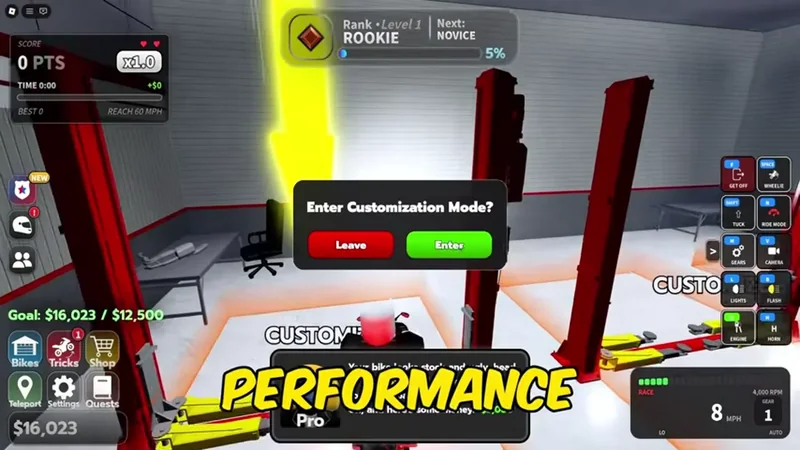
After confirming a change, return to the Garage and check that the motorcycle is still marked OWNED and is the one equipped for riding. If the road spawn does not match the garage selection, correct the equipped vehicle before spending on another customization purchase.
Paint, Finish, and Wheels
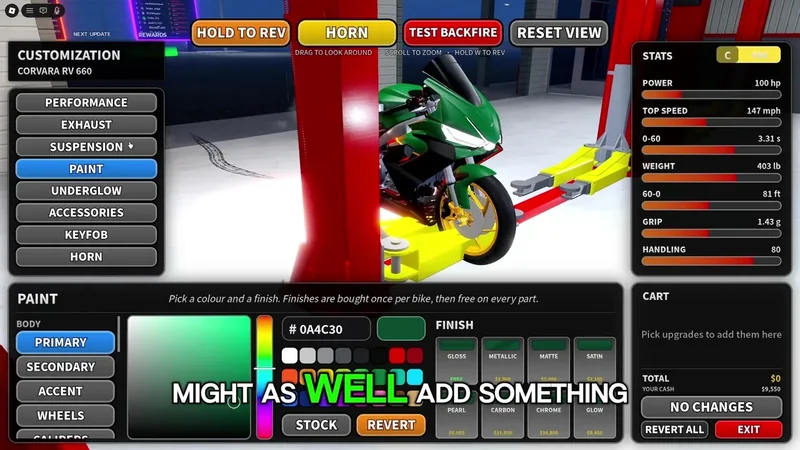
Paint is the straightforward appearance choice: open the Paint category, preview a color, and compare it against the bike before confirming. Recorded gameplay shows red as one selected paint color, but that does not establish a complete color list or a fixed price. Choose from the palette currently shown rather than relying on a color name from an older guide.
Choose a paint color in Night Rider customization
This moment supports the Paint guidance by showing the route to Customization and a recorded red paint selection.

Finish is a related choice inside the paint area. It changes the surface treatment of the paint, so it is useful to evaluate Paint and Finish together instead of assuming that a color alone describes the final appearance. The visible interface includes a Finish palette, but not every effect name or price is reliably documented. If a finish is unavailable, locked, or absent, do not infer that it has been removed permanently; check the current vehicle and current menu first.
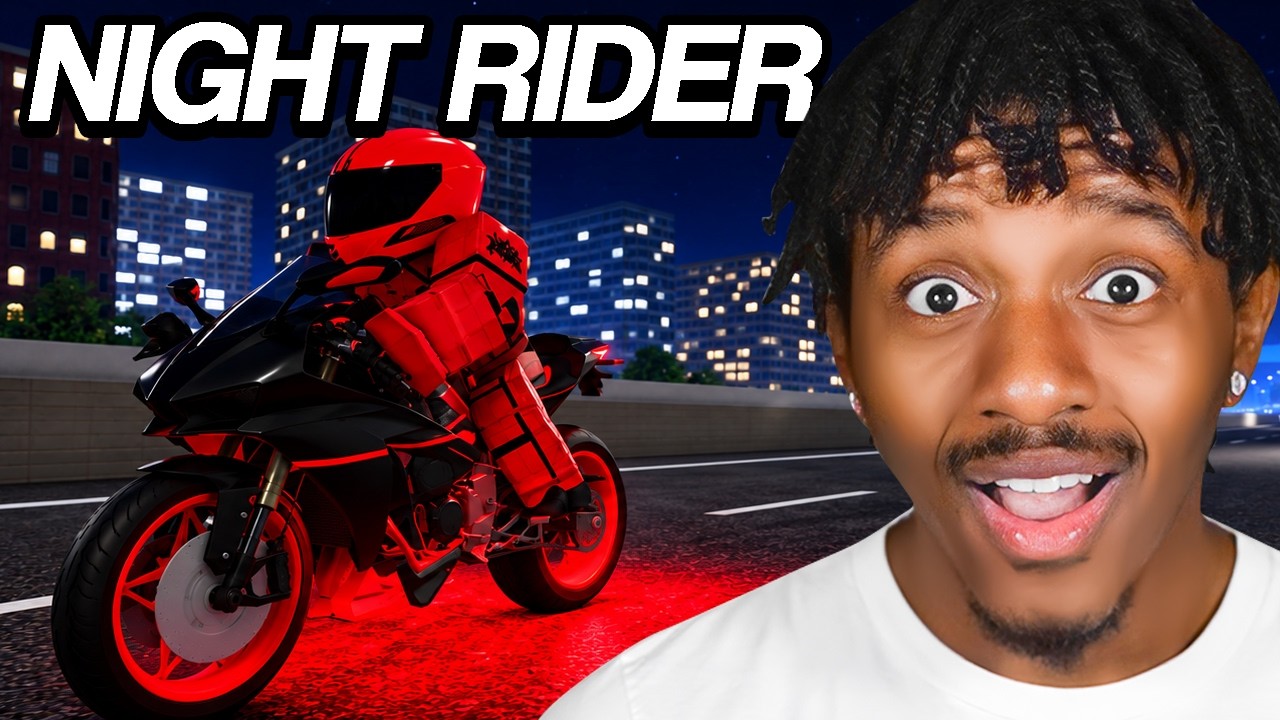
Wheels change the bike’s visual presentation. A recorded example shows white wheels, confirming that wheel appearance can be selected independently from the paint color. The available wheel list is not complete in the current records, and the evidence does not support a universal wheel-price table. Preview the wheels on the selected motorcycle before deciding whether the result is worth the displayed cost.
Preview wheel appearance in Night Rider customization
This moment supports the Wheels guidance by identifying white wheels while discussing the bike's appearance.
These three categories should be judged as cosmetic unless the current interface explicitly says otherwise. Changing paint, finish, or wheels is not evidence of a speed, handling, or earning increase. If the goal is better riding performance, move to Engine or Transmission and read the performance panel instead.
Engine and Transmission upgrades
Engine upgrades are the clearest performance-related customization path. The interface has shown a Stage 1 engine upgrade with a cart total of $5,250 during a recorded view. That number is a useful example of how the cart reports a cost, not a guaranteed current price. Before confirming, check the selected stage, the bike shown in the garage, and the final total in the current cart.
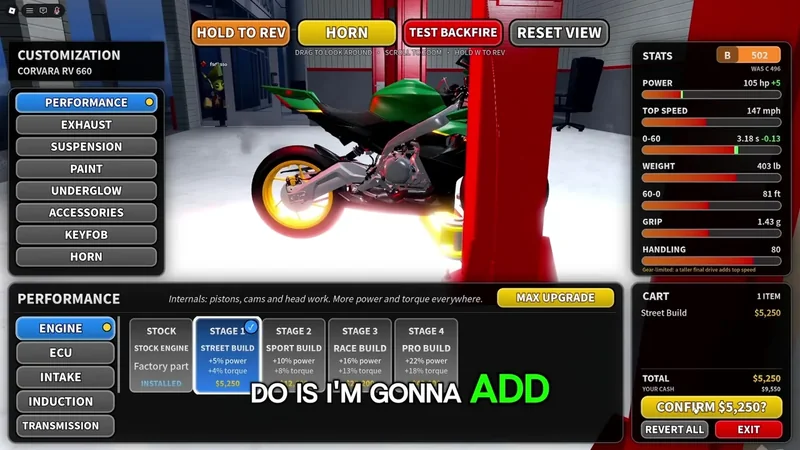
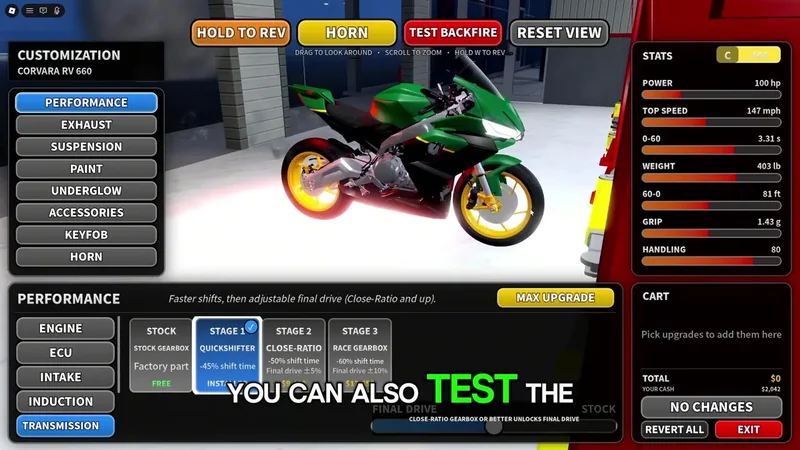
The performance panel is also the safer way to interpret an upgrade. The current records do not establish one universal numeric increase for speed, handling, or earning efficiency, so do not treat an engine stage as a guaranteed percentage improvement. Compare the values the game currently displays for your motorcycle, and keep enough Cash for the purchase rather than planning around an old total.
Transmission is a separate category. It appears in the customization garage and can expose upgrade entries that are locked. The current evidence does not reliably identify every prerequisite, Cash requirement, or stage order. A lock is therefore a decision boundary: read any requirement the game supplies, but do not guess that the next engine stage, a specific bike, or a particular level automatically unlocks it.
Engine and Transmission should be considered before buying another motorcycle when your goal is performance. Dealership purchases reduce the Cash available for upgrades, while an upgrade may improve the bike you already own. Use the bike comparison guide to weigh that purchase against the current upgrade cart. Compare the dealership price, the current bike’s displayed performance, and the exact upgrade cart total in the same session. No fixed tier list is supported by the current customization records.
Shop items and currency boundaries
Underglow, RGB Lighting, and Custom Plates are presented as Shop-style appearance options rather than the same Cash-funded path as an engine or transmission upgrade. The records indicate that these items may require Robux, while motorcycles and performance upgrades involve Cash. Confirm the currency and amount on the purchase panel before clicking confirm; a visually similar catalog entry does not mean the two systems share a budget.
Custom Plates should be treated cautiously. The Shop category is documented, but the current records do not confirm a complete plate-text rule or a permanent price. If the game asks for a value or displays a restriction, follow that current prompt. Do not assume that a plate can accept arbitrary text or that a previous price still applies.
The same rule applies to lighting. Underglow and RGB Lighting are confirmed as Shop categories, but the available records do not provide a stable item-by-item price list. Use the preview and the current transaction panel to decide whether the effect is cosmetic value you want, and keep Robux purchases separate from Cash planning for bikes and upgrades.
Choosing what to buy first
If you want a visual identity, begin with Paint, then test Finish and Wheels on the same bike. This avoids spending on a color before discovering that the surface treatment or wheel combination is the part you actually prefer. If you want a performance change, inspect Engine first and use the displayed performance values and cart total. Check Transmission separately because its entries may be locked.
If your Cash is limited, compare customization with a dealership purchase. Buying a new motorcycle can leave less Cash for an engine or transmission upgrade, while appearance work may not address the riding result you want. If the main objective is earning or handling, prioritize only the upgrade whose current panel shows a relevant change; the available records do not justify claiming a fixed improvement for every stage.
The safest comparison is therefore made in the order the game presents it: select the bike, inspect the category, preview the result, and read the cart or performance panel. A catalog label alone is not enough to establish a current price or benefit. This is particularly important when an item is shown in Shop while the upgrade you are comparing is shown in the customization garage, because the purchase confirmation may use a different currency and a different ownership state.
Before every confirmation, use this short decision check:
- Is the intended motorcycle selected and equipped?
- Is the item cosmetic, a Cash upgrade, or a Shop purchase that may use Robux?
- Does the current panel show the exact price, stage, or lock state?
- Does the preview or performance panel show the result you expect?
- After purchase, does the Garage still show the correct bike as
OWNEDand equipped?
This check is especially important because the game is in a test-stage state. Categories, discounts, prices, and unlock conditions may move without preserving the values seen in an earlier recording.
When a customization purchase is unclear
If Cash or Robux appears to be deducted but the appearance or upgrade is not visible, do not immediately buy the same item again. Return to the Garage, reselect the motorcycle, and check whether the item is equipped or whether the performance panel changed. Also check the cart and ownership state after the interface refreshes. Keep the transaction details if the result still does not appear, then use the game’s official support route rather than repeating a potentially chargeable purchase.
The current records cannot confirm a complete catalog, all color and wheel names, fixed lighting prices, custom-plate text rules, or the exact Transmission unlock path. Those are boundaries on what can be promised, not reasons to ignore the menu. For a current decision, use the selected bike’s live customization panel, the displayed currency, the final cart total, and the resulting Garage state.
Night Rider customization FAQ
Does Paint change a bike’s performance?
Paint is documented as an appearance option. Treat it as cosmetic unless the current game panel explicitly shows a different effect; Engine and Transmission are the categories to inspect for performance changes.
What was the recorded Stage 1 engine cost?
A recorded customization view showed a Stage 1 engine upgrade with a $5,250 cart total. Use the current cart as the final price because test-stage values, discounts, and upgrade availability can change.
Why is a Transmission upgrade locked?
Transmission entries can appear locked, but the available records do not establish one reliable unlock rule. Read the requirement shown in the current menu instead of assuming a level, bike, or engine stage is always required.
Do Shop lighting items use the same currency as upgrades?
Not necessarily. Underglow, RGB Lighting, and Custom Plates are Shop-style options that may use Robux, while engine and transmission work is associated with Cash. Confirm the currency on the purchase panel before accepting the transaction.
SourcesReviewed November 5, 2026
https://www.nightriderroblox.wiki/guides/bikes-and-customization/