Start with a controlled Night Rider ride
Night Rider riding is easiest to learn as a short control exercise, not as an immediate high-speed challenge. Spawn an owned motorcycle from the Garage, read the Riding HUD, and first confirm that you can steer, brake, change the camera, and stop a Wheelie. Once the bike feels predictable, use open traffic for Near Miss attempts and equip a Trick only after you understand how the bike reacts.
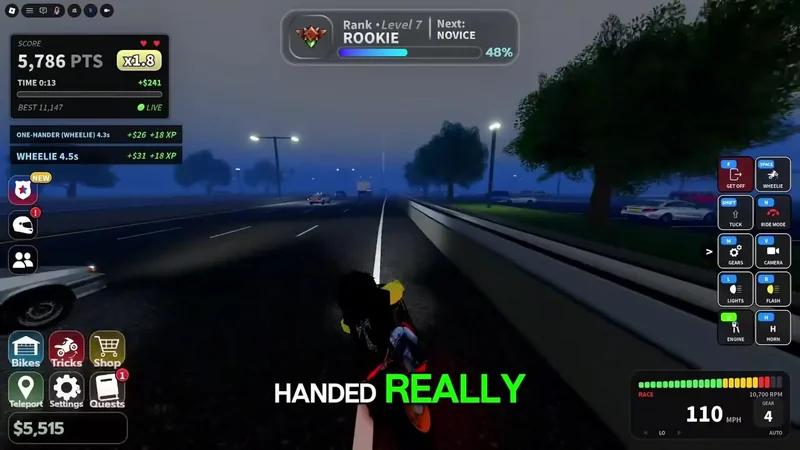
Your first-session target is simple: complete one clean ride, perform a brief Wheelie, recognize the balance warning, and recover from a mistake without repeatedly stacking speed, traffic, and tricks. The PC recording shows F for getting off, Space for Wheelie, Shift for Tuck, N for Ride Mode, M for Gears, and V for Camera. L, B, E, and H are shown for lights, flash, engine, and horn. Other devices may display different bindings, so use the live HUD as the authority.
How a ride moves from garage to road
Riding is a session-based open-road activity. The Garage supplies the motorcycle; the road supplies movement, traffic, near-miss opportunities, and room to practice. There is no required linear route in the available riding guidance. You choose when to switch views, attempt a Wheelie, interact with traffic, open the Tricks menu, or return to the Garage.
A useful session has four states. First, the bike is spawned and its HUD is checked. Second, you establish ordinary forward control before adding a stunt. Third, you use the road for a goal such as a short Wheelie, a Trick, or a Near Miss. Finally, you either continue with a new goal or recover from a Wipeout and reset your pace. Cash can come from riding activities, while Near Miss income is supported but its exact reward formula is not established here.
This structure matters because every extra input adds risk. A Wheelie, a fast turn, dense traffic, and a police encounter can overlap, but the evidence does not establish a fixed death-wobble threshold or a guaranteed recovery maneuver. Treat each as a separate skill until you can repeat it safely.
Controls, tricks, and road signals
Use these elements as a beginner checklist rather than trying to master them all at once:
- Riding HUD: Appears after you get on the motorcycle and shows current driving and stunt prompts. It is the best reference for the active device and version.
- Camera views: The recorded ride demonstrates first-person, face-camera, and a third-person or GTA-style view. Change views with the HUD camera input so you can choose visibility before entering traffic.
- Wheelie balance: Wheelie raises the front wheel and uses a balance display. Keep the attempt short while learning; when the bar approaches danger or the bike begins to wobble, end the stunt and return to two-wheel riding.
- Ride Mode and Gears: The PC controls list
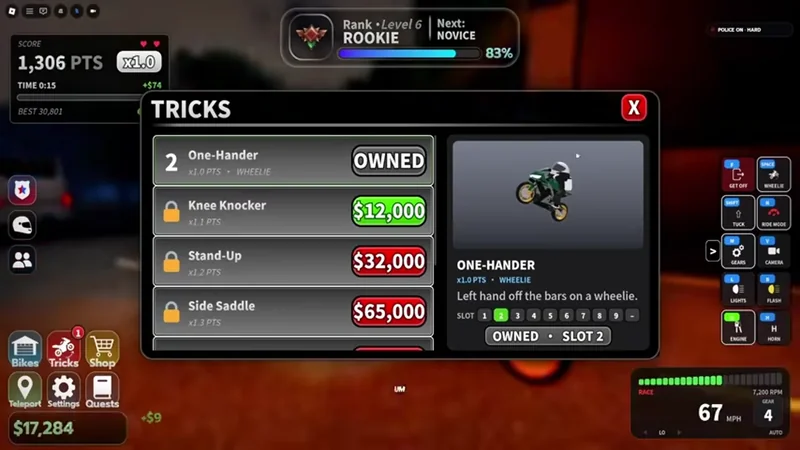
Nfor Ride Mode andMfor Gears. Test them on a straight, open section and check the HUD before assuming the same bindings on controller or mobile. - Tricks menu: Tricks are equipped actions, not automatic rewards. One-Hander is shown as owned and equipped in a recorded menu, with an
x1.0 PTSlabel. Other displayed options include Knee Knocker at$12,000andx1.1 PTS, Stand-Up at$32,000andx1.2 PTS, and Side Saddle at$65,000andx1.3 PTS. - Traffic and Near Miss: Traffic creates the road challenge. Passing close to a vehicle can produce a Near Miss and income, but the precise payout is not confirmed. Use ordinary riding first; do not combine a first Wheelie with dense traffic.
- Passenger riding: A passenger can appear on the rear seat in the recorded ride. That confirms the visual riding state, but not a separate passenger mission, fixed reward, or special rule.
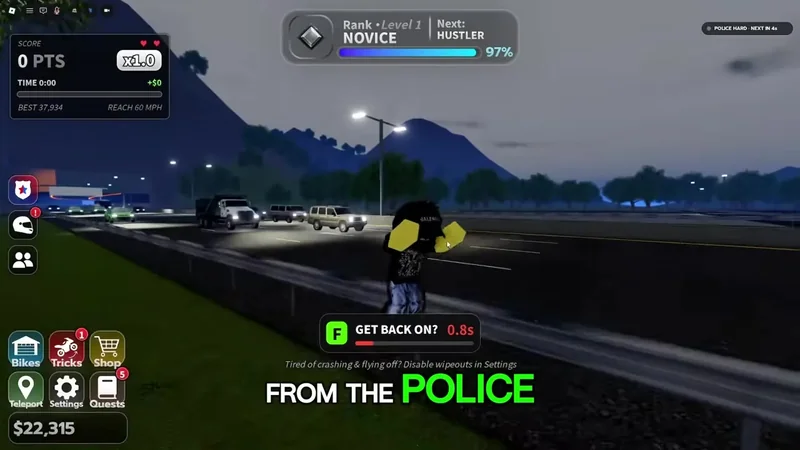
- Get Back On: After a collision or Wipeout, the
GET BACK ON?prompt is the recovery checkpoint. Use it to resume rather than continuing to send driving inputs while the recovery prompt is active.
The PTS labels in the Tricks menu should be read as displayed trick-score information, not as a confirmed Cash multiplier. Buying a trick also does not prove that it is currently assigned to the slot or that every motorcycle uses the same input.
Your first complete road practice
- Spawn a known motorcycle. Open the Garage, select a bike you own, and use the spawn action. The checkpoint is the bike appearing beneath you with the Riding HUD visible. If the HUD is covered by an introductory overlay, clear that before moving; then continue only when you can see the controls.
- Read the active inputs. Identify the steering, braking, camera, Wheelie, and get-off prompts for your device. On the recorded PC layout,
Vchanges the camera andFgets off. Do not rely on a keyboard list if your platform shows another layout. Once the prompts are clear, move to an open stretch. - Ride normally first. Accelerate gently, steer through a broad turn, and brake to a controlled stop. Confirm that the camera gives you enough road visibility. This checkpoint establishes ordinary control before a stunt; if you cannot stop cleanly, stay in this stage instead of entering traffic.
- Change the view while stable. Switch between the available camera perspectives on a straight section. The recorded views include first-person, face camera, and third-person or GTA-style framing. Return to the view that makes traffic and the motorcycle easiest to judge, then continue forward.
Practice a Wheelie and change the riding camera
This moment supports the camera and Wheelie practice described in the controlled road-riding steps.
- Try a short Wheelie. On a clear straight, use the HUD Wheelie input; the PC recording uses
Space. Hold it briefly and watch the balance display rather than chasing a duration record. End the Wheelie before the bar reaches a dangerous state or the motorcycle starts to sway. A stable return to both wheels is the success checkpoint.
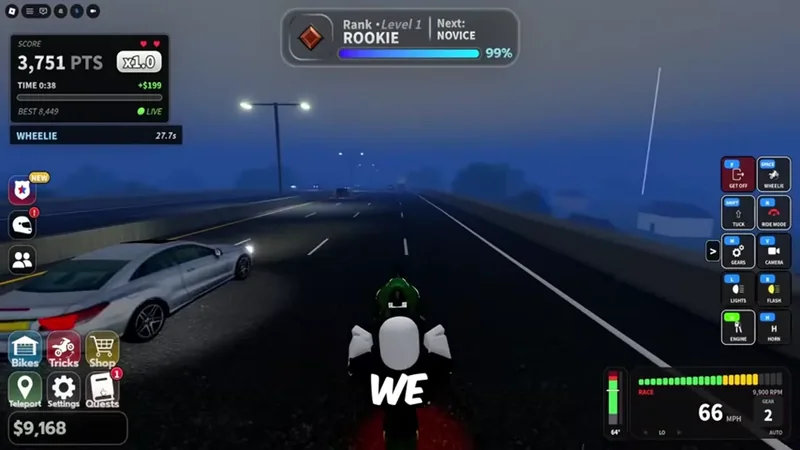
- Add only one road objective. Choose either a short second Wheelie, a basic equipped Trick, or a cautious pass near traffic. For a Near Miss, leave room to correct and do not assume a fixed Cash payout. If you choose a Trick, confirm it is equipped in the Tricks menu first, then follow the live prompt rather than copying an input that has not been verified for that Trick.
- Verify the result and choose the next state. Look for the stunt or activity result in the HUD and check whether the bike remains controllable. Continue with ordinary riding if the road is clear, return to the Tricks menu if you need to change equipment, or stop and reset if traffic and speed have made the ride unstable.
- Recover or finish deliberately. If you wipe out, wait for
GET BACK ON?and use that recovery action before trying to ride again. If the practice run is clean, end it withFon the PC layout or the equivalent HUD action. Either outcome gives you a repeatable checkpoint for the next session.
Priorities when the bike goes wrong
Keep control and visibility ahead of score. Prioritize ordinary steering and braking, then camera choice, then a short Wheelie, and only afterward traffic, Tricks, or a police-related challenge. Once those basics are stable, the police chase guide covers the higher-risk challenge. The game can connect riding with Cash, Levels, Quests, and Ranks, but a safe repeatable ride is more useful than a single long stunt that ends in a Wipeout.
- The bike starts to wobble during a Wheelie: End the Wheelie, reduce speed, and straighten your steering. The game guidance mentions a vehicle “death wobble” but does not establish a universal trigger or guaranteed fix.
- You lose control near traffic: Stop adding inputs, regain a straight line, and practice away from traffic before attempting another Near Miss. Do not treat a close pass as a required step for learning the controls.
- The camera makes the road hard to judge: Switch to another HUD camera view on a clear section, then resume only after you can see the bike and nearby road space.
- A purchased Trick does not appear in play: Reopen the Tricks menu and confirm ownership and slot assignment. Purchase status alone does not establish that the Trick is equipped.
- A Wipeout leaves the motorcycle stopped: Use
GET BACK ON?and wait for the recovery state to finish before sending another movement input. - You are unsure about a control on mobile or controller: Follow the current on-screen HUD rather than the PC key list. The available mapping is not complete for every device.
Recover and get back on after a Wipeout
This moment supports the article's recovery guidance for using the GET BACK ON? prompt after losing control.

Night Rider riding is therefore best learned in layers: spawn, read, move, view, Wheelie, then choose one activity. Keep the exact HUD prompts and current in-game Trick panel in charge of mutable controls and prices.
First-time Night Rider riding questions
Which control should I trust if I play on mobile or controller?
Trust the current Riding HUD for your device. The available recording confirms a PC layout, but it does not provide a complete mobile or controller mapping.
Does buying a Trick equip it automatically?
Not necessarily. Open the Tricks menu after buying a Trick and confirm that it is owned and assigned to a slot before trying to use it.
What should I do when the motorcycle begins to wobble?
End the Wheelie, reduce speed, and straighten the bike before adding another input. The available guidance mentions a death wobble but does not establish one universal trigger or guaranteed recovery action.
Does a passenger create a separate riding mission?
The passenger riding footage confirms a passenger can appear on the rear seat, but it does not confirm a separate passenger mission, fixed reward, or special route.
Are the Trick PTS labels Cash multipliers?
Treat the PTS labels as displayed trick-score information, not as confirmed Cash multipliers. Use the current Tricks panel for the active price and slot details.